How to Remove Your Personal Information From the Internet (Complete 2026 Guide)
Free step-by-step guide: remove your address from Google, opt out of Whitepages, Spokeo, BeenVerified and 12 more sites, and use California DROP.
Key takeaways
- Google's free Results about you tool hides search results that show your home address, phone, email or ID numbers. It doesn't delete the page itself.
- Every major people-search site has a free opt-out form. You need the exact URL of each listing, and most confirm by email or phone.
- California residents can send one free deletion request to more than 600 registered data brokers through DROP.
- Listings come back from new records, so re-check every few months. In Consumer Reports' 2024 test, manual opt-outs removed about 70% of profiles, versus about 35% for paid services.
Imagine typing a stranger's name into a search bar. A few clicks later you're looking at his home address, his cell number, his mother's name and where he works. You pay a dollar for the "full report" and it shows even more. The whole thing takes about four minutes.
We re-created that experiment using a fictional person named "Daniel Reyes" and a mock people-search site. Daniel isn't real. The process is. Sites like these build profiles on millions of real people from public records, social media and data they buy from other companies, and they sell them to anyone who asks (FTC).
The good news: you can remove most of it yourself, and most of the tools are free. This guide walks through every step. You'll find which sites list you, get your address out of Google, opt out of the 15 biggest people-search sites, use state laws like California's DROP, and keep your information from coming back.
Quick answer: Start with Google's free Results about you tool. Then opt out of each people-search site that lists you, one at a time, using its official form. If you live in California, file one free request through DROP. Re-check every few months, because listings come back.
Every opt-out link in this guide was checked on October 12, 2026. Sites change their forms often. Where we couldn't load a page ourselves, we say so and tell you to check the current page.
How data brokers get your information
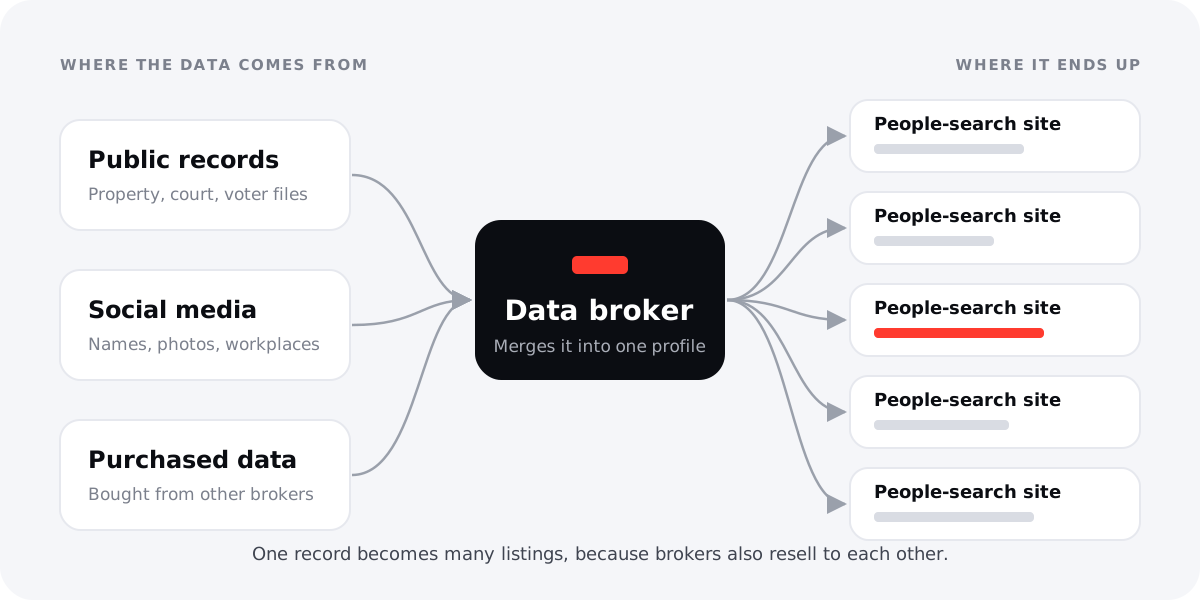
People-search sites are one kind of data broker. According to the Federal Trade Commission, they put together reports from three main places (FTC):
- Government and public records, such as property records, court records and voter files where those are public.
- Public social media profiles, including names, photos, workplaces and connections you or others have posted.
- Data bought from other companies, including other brokers.
Then they sell those reports to anyone, usually with no questions asked. The scale is large. California alone has more than 600 registered data brokers (CalPrivacy), and brokers resell to each other, so a single record often becomes many listings on many sites. For what's actually in those files, see what data brokers know about you.
Two facts shape everything else in this guide:
- There's no federal law that gives you the right to opt out of people-search sites (Consumer Reports, 2024). Most sites offer opt-outs anyway, and some state laws require them, but the rules are a patchwork.
- Opting out doesn't delete the underlying public records. It stops that site from showing and selling your profile. The courthouse or county recorder still has the original (FTC; Spokeo opt-out page).
How to find out which sites have your information
Before you remove anything, make a list. Opt-out forms almost always ask for the exact URL of your listing, so you'll need it anyway.
Step 1: Search Google. Try each of these, and use quotation marks around your name and phone number:
- "Your Full Name" + your city
- "Your Full Name" + each past city or address
- your phone number in quotes, in both formats: "555-555-0100" and "(555) 555-0100"
- your personal email address in quotes
- your name with a middle initial, a maiden name or a nickname
Step 2: Search the big sites directly. Go to each site in the list below and search your name and state. Many listings don't rank in Google but are still on the site.
Step 3: Keep a tracker. A simple spreadsheet works. Use these columns, and fill in a row for every listing you find:
| Site | Listing URL | Opted out | Confirmed | Re-checked |
|---|---|---|---|---|
| Spokeo | spokeo.com/Daniel-Reyes/... | Oct 12 | Yes | Nov 11 |
| Whitepages | whitepages.com/name/Daniel-Reyes/... | Oct 12 | Waiting | |
| FastPeopleSearch | fastpeoplesearch.com/daniel-reyes_id_... | Oct 13 |
Step 4: Use a separate email address. Most opt-outs send a confirmation link. A dedicated email address for privacy requests keeps your main inbox out of more databases. Give each form only the information it requires (FTC).
How to remove your address from Google
Google doesn't host people-search listings, but it's how most people find them, so removing results there cuts off most casual lookups while you work on the source sites. Google's free Results about you tool watches Search for your home address, phone number, email address and some ID numbers, alerts you when they appear, and lets you request removal in a couple of taps. More than 10 million people have used it (Google, Feb. 2026).
Two things to know: Google removes the search result, not the page itself, so you still need to opt out at the source site; and it usually won't remove results from government sites or news outlets (Google Search Help).
Full walkthrough: our step-by-step guide, How to remove your address from Google, covers setup, alerts, removal from the results page, what Google won't remove, and how to clear old cached copies.
How to opt out of the 15 biggest people-search sites
Every site works a little differently, but most follow the same pattern: find your listing → copy its URL → paste it into the opt-out form → confirm by email or phone. Opting out is free on every site below. If a page asks you to pay to remove your listing, you're not on the official form.
Many of these sites are owned by the same company. One request can cover several sites, so we've grouped them where that's the case.
| # | Site | Official opt-out page | What you need | Stated processing time | Status Oct 12, 2026 |
|---|---|---|---|---|---|
| 1 | Whitepages (full guide) | whitepages.com/suppression-requests | Listing URL + phone for automated call (or web form / email) | Up to 2 business days for form/email | Verified |
| 2 | Spokeo | spokeo.com/optout | Listing URL + email | 24–48 hours | Verified |
| 3 | BeenVerified | beenverified.com/app/optout/search | Name search + email | Check current page | Check current page |
| 4 | TruePeopleSearch | truepeoplesearch.com/removal | Check current page | Check current page | Check current page |
| 5 | FastPeopleSearch | fastpeoplesearch.com/removal | Name + email, then a second form | Up to 3 days | Verified |
| 6 | Intelius | suppression.peopleconnect.us | Email, then pick your report | Not stated | Verified |
| 7 | Instant Checkmate | suppression.peopleconnect.us | Same request as Intelius | Not stated | Verified |
| 8 | TruthFinder | suppression.peopleconnect.us | Same request as Intelius | Not stated | Verified |
| 9 | PeopleFinders | help.peoplefinders.com removal article | Online form (or phone) | Check current page | Partly verified |
| 10 | MyLife | mylife.com/privacyrequest | Profile URL + details + email | Check current page | Check current page |
| 11 | Radaris | No opt-out: domain seized by court order | n/a | n/a | Verified (see note) |
| 12 | Nuwber | nuwber.com/removal/link | Listing URL + email | Up to 48 hours | Verified |
| 13 | ThatsThem | thatsthem.com/optout | Name, address, email, phone | About 72 hours | Verified |
| 14 | USPhoneBook | usphonebook.com/opt-out | Name + email, then a second form | Up to 3 days | Verified |
| 15 | PeopleLooker | peoplelooker.com/svc/optout/search/optouts | Name search + email | About 24 hours | Verified |
1. Whitepages opt-out
Paste your listing URL at whitepages.com/suppression-requests and verify with an automated phone call; if you'd rather not give a phone number, Whitepages also takes requests by web form or email (Whitepages Consumer Privacy Rights). Full instructions and troubleshooting: How to remove yourself from Whitepages.
2. Spokeo opt-out
- Opt-out URL: spokeo.com/optout
- What you need: your profile URL (it looks like spokeo.com/Name-Name/City/ST/p12345678) and an email address.
- How: Paste the URL, enter your email, click Opt Out, then click the link in the confirmation email.
- Time: 24–48 hours, according to Spokeo.
- Gotchas: You may have several Spokeo listings, and each must be opted out separately. Spokeo also says that because it keeps receiving new public records, "your information may reappear on Spokeo in the future without notice." Re-check regularly.
3. BeenVerified opt-out
- Opt-out URL: beenverified.com/app/optout/search. Check current page: a bot check blocked us from loading it on Oct 12, 2026.
- What you need: search for your name and state, select your record, and enter an email address for verification.
- Time: check current page.
- Gotchas: Make sure you're on beenverified.com and that the form never asks for payment. Watch for the confirmation email in your spam folder.
4. TruePeopleSearch opt-out
- Opt-out URL: truepeoplesearch.com/removal. Check current page: a bot check blocked us from loading the form.
- What you need: check current page. These forms typically ask you to find your record and confirm by email.
- Gotchas: TruePeopleSearch often ranks near the top of Google for name searches, so it's worth doing early. Also remove the Google result through Results about you.
5. FastPeopleSearch opt-out
- Opt-out URL: fastpeoplesearch.com/removal
- What you need: your name and email address, plus a captcha. FastPeopleSearch emails you a link to a second form, where you enter details that match the record you want removed.
- Time: The email link expires after 24 hours. FastPeopleSearch asks you to allow 3 days for removal.
- Gotchas: The site says leaving out or mistyping information "will only hinder the opt-out process," so match the record exactly.
6–8. Intelius, Instant Checkmate and TruthFinder (one request)
These three sites, plus USSearch, belong to PeopleConnect. They share one opt-out tool, the PeopleConnect Suppression Center.
- Opt-out URL: suppression.peopleconnect.us. TruthFinder's own opt-out page sends you here too.
- What you need: an email address. You'll get a verification link, then you find your background report and choose to suppress it.
- Time: not stated.
- Gotchas: PeopleConnect says suppression stops your background report from showing when someone searches you by name on its sites. Guides that quote the tool's FAQ say reverse phone or address searches can still show you, so check those too. PeopleConnect also says the tool is free; the official tool never asks for payment.
9. PeopleFinders opt-out
- Opt-out URL: PeopleFinders' help article "How do I remove my information from PeopleFinders?" links to its online removal form. Check current page for the form itself, since a bot check blocked us from loading it. You can also call (800) 718-8997. PeopleFinders doesn't accept opt-outs by fax or mail.
- Gotchas: PeopleFinders.com is a different company from PeopleFinder.com (no "s"), so check which one lists you. PeopleFinders says it can only block records in databases it controls.
10. MyLife opt-out
- Opt-out URL: mylife.com/privacyrequest (Privacy Request Form), or email membersupport@mylife.com. Check current page: the older address, mylife.com/ccpa/index.pubview, returned a 404 when we tested it.
- What you need: your profile URL, name, location and an email address for verification.
- Gotchas: MyLife's help page offers removal to "residents of states with applicable privacy laws." If you live elsewhere, try the form anyway. Removing your profile also closes any MyLife account tied to your information.
11. Radaris: currently offline
When we checked on October 12, 2026, radaris.com showed a notice that a New Jersey court had transferred the domain to Atlas Data Privacy Corporation. The court entered a final default judgment on August 27, 2026, under New Jersey's Daniel's Law (Atlas Data Privacy Corp. v. Radaris.com, MID-L-000847-24). There's currently no Radaris opt-out form to use. Keep it on your tracker and re-check later, and remove any old Radaris results from Google with Results about you.
12. Nuwber opt-out
- Opt-out URL: nuwber.com/removal/link
- What you need: find your listing by name and state, paste its URL, and enter your email address. Confirm from the email you receive.
- Time: up to 48 hours.
- Gotchas: Nuwber says your page can still appear in Google for up to 8 weeks. To check removal, open your old listing URL; Nuwber says a "410" response means the page is gone.
13. ThatsThem opt-out
- Opt-out URL: thatsthem.com/optout
- What you need: full name, street address, city, state, ZIP code, email and phone. All are required fields.
- Time: typically 72 hours, followed by a confirmation email.
- Gotchas: This form asks for more than most. That's what the form requires, but give only what it asks for. Opting out only affects ThatsThem's own search results.
14. USPhoneBook opt-out
- Opt-out URL: usphonebook.com/opt-out
- What you need: name and email address, plus a captcha. Then click the emailed link within 24 hours and fill in a form that matches your record.
- Time: allow 3 days.
- Gotchas: The same "match the record exactly" rule applies here as with FastPeopleSearch.
15. PeopleLooker opt-out
- Opt-out URL: peoplelooker.com/svc/optout/search/optouts
- What you need: search for yourself, select your record, and confirm by email.
- Time: usually about 24 hours after the confirmation email.
- Gotchas: The online form removes only one record. If you have more than one, email privacy@peoplelooker.com. You don't need to be a member, and you never have to pay.
What about the rest? Hundreds of smaller sites exist. If you find yourself on one that isn't listed here, look in its footer for links like "Do Not Sell or Share My Personal Information," "Opt Out," "Privacy Request" or "Remove My Listing." You can also search for "[site name] opt out."
State laws that help
California: the Delete Act and DROP
If you live in California, you have the strongest tool in the country (full DROP walkthrough). DROP (the Delete Request and Opt-out Platform at privacy.ca.gov/drop) was created by the Delete Act. It lets you send one free request to more than 600 registered data brokers (CalPrivacy).
How it works:
- You confirm that you're a California resident and create a profile with the details you choose.
- Since August 1, 2026, registered brokers must check DROP at least every 45 days and delete matching data, including inferences they've made about you, unless an exemption applies.
- Brokers must keep a suppression list, so data that doesn't match yet is blocked if it shows up later.
- Status updates can take up to 90 days.
- Brokers that don't comply can be fined $200 per day per request (CalPrivacy; CPPA).
DROP only covers registered data brokers and California residents. It doesn't remove Google results or public records. You'll still use Results about you and individual opt-outs for anything DROP doesn't reach.
Other states
- Comprehensive state privacy laws: Whitepages' own privacy notice lists rights processes for residents of Colorado, Connecticut, Delaware, Indiana, Iowa, Kentucky, Maryland, Minnesota, Montana, Nebraska, New Hampshire, New Jersey, Oregon, Rhode Island, Tennessee, Texas, Utah and Virginia. If you live in one of these states, look for a "Your Privacy Choices" or "Do Not Sell" link. Some sites, like MyLife, limit removal to residents of states with these laws.
- New Jersey's Daniel's Law protects the home addresses and unpublished home phone numbers of covered people, including law enforcement officers, prosecutors and judges. It's the law behind the Radaris domain seizure described above (what the Radaris judgment means). If you're a covered person in another state, check whether your state has a similar law. PeopleConnect, for one, accepts suppression requests from protected people such as judges and law enforcement officers under applicable law.
If you're in danger
If you're dealing with domestic violence, stalking or harassment, removing your information is about safety, not just privacy. A few things are different for you:
- Get expert help first. The National Domestic Violence Hotline (1-800-799-7233, or chat at thehotline.org) can help with safety planning, including online privacy. NNEDV's Safety Net Project (techsafety.org) publishes guides on technology safety for survivors.
- Ask about an Address Confidentiality Program (ACP). Most states run ACPs, sometimes called "Safe at Home." They give survivors of domestic violence, and in many states sexual assault and stalking, a substitute address for public records such as voter registration and driver's licenses. That keeps a new address out of the records brokers copy (NNEDV; NASS). The National Association of Confidentiality Programs keeps a state-by-state list with contacts, and the NASS issue brief (Jan. 2026) lists which agency runs each state's program.
- Moving? Our guide to keeping a new address private after stalking or abuse goes step by step.
- Think about timing. Removing listings before a move works better than after, because a new address can show up in records within months.
- Be careful what you give opt-out forms. Give each form only what it requires. Use a separate email address. Don't confirm your new address to any site that doesn't already have it.
- Use Google's doxxing protections. Google also accepts removal requests for content that shares your personal information to harm you (Google Search Help).
Why your information comes back
This is the part most guides skip. Opting out stops a site from selling the information it already has. It doesn't stop the site from getting new information (FTC). Listings come back when:
- public records change, like a move, a new property record or a new phone number
- a relative's report lists you as an associate
- the site buys a fresh batch of data from another broker
- you opt out of one listing but you had several (Spokeo, for one, gives each listing its own URL)
Spokeo says plainly that your information "may reappear... in the future without notice." That's why removal is maintenance, not a one-time job. If you want it laid out on a calendar, see our 30-day plan to delete yourself from the internet.
A simple maintenance schedule
- Week 1: Run Results about you, do every opt-out on your tracker, and file DROP if you're in California.
- Day 30: Re-check every listing URL, and re-submit any that are still live.
- Day 90: Search yourself again with the same queries from step 1. Check DROP status.
- Every 3–6 months after that: Repeat the full search. Do it right away after you move, change your phone number or buy property.
- Ongoing: Keep Results about you notifications on, so Google tells you when new results appear.
DIY vs. removal service
Can you pay someone to do this? Yes, and plenty of companies will take your money. Before you choose, look at the best independent test so far.
In 2024, Consumer Reports and security firm Tall Poppy tested 7 removal services with 32 volunteers across 13 people-search sites (Consumer Reports, Aug. 2024). They found:
- After four months, the services had removed only about 35% of the profiles overall. The best removed 68% and the worst 4%.
- Manual opt-outs did better, about 70%, and most worked within a week.
- Some sites required ID or an account, or used deceptive designs that made opting out harder.
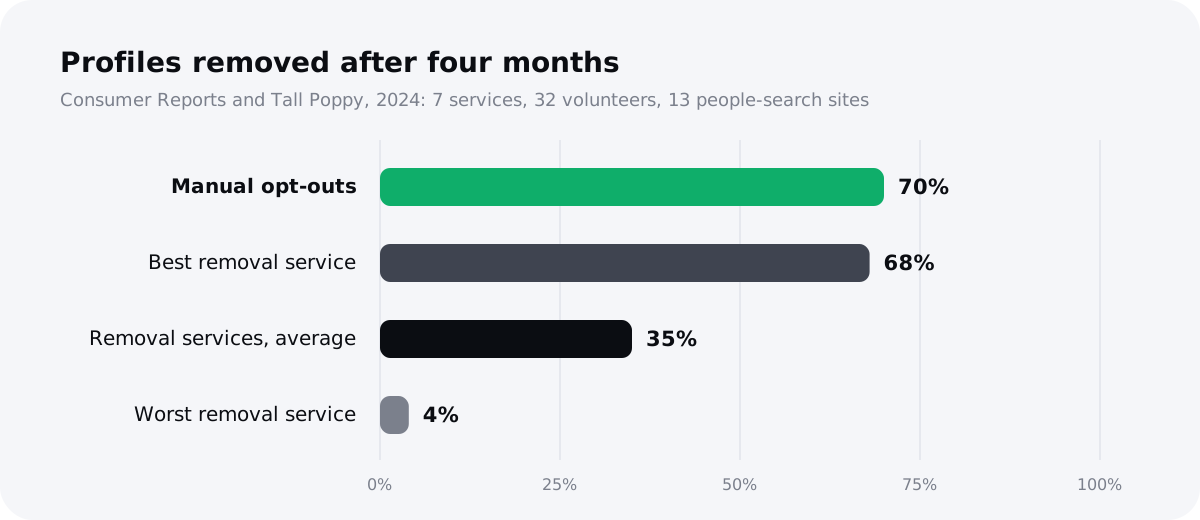
So the honest answer is this: doing it yourself can be more thorough. What it costs you is time.
| Doing it yourself | Using a removal service | |
|---|---|---|
| Cost | Free | Paid subscription |
| Removal rate in CR's 2024 test | About 70% | About 35% on average (4%–68% range) |
| Time | Hours up front, plus re-checks | Minutes to set up |
| Re-checking for relistings | You have to remember | Done automatically on a schedule |
| Sites with odd forms or phone checks | You handle each one | Varies by service; ask which sites they cover |
| Control over what you share | Full | You share your details with the service |
The FTC suggests asking any paid service exactly which sites it covers, how it removes you, and what happens after (FTC).
Where UndoLeak fits
We built UndoLeak for people who don't have hours to spend on opt-out forms and re-checks. It sends removal requests for you, keeps checking the sites on a schedule, and re-files when a listing comes back. It doesn't do anything you couldn't do yourself with this guide. What it saves you is the time and the remembering. If that trade is worth it to you, scan your name for free at undoleak.com. If not, the free checklist below will get you most of the way.
Free checklist
Copy this into your notes and work down it:
- Create a separate email address for privacy requests
- Start a tracker: site, listing URL, date submitted, confirmed, re-check date
- Search Google for your name + city, past addresses, phone and email
- Set up Google Results about you with all your addresses, phones and emails, and turn on notifications
- Request removal of every result that shows your contact info
- Opt out of Whitepages
- Opt out of Spokeo (every listing URL)
- Opt out of BeenVerified and PeopleLooker
- Opt out of TruePeopleSearch, FastPeopleSearch and USPhoneBook
- Suppress your report at the PeopleConnect Suppression Center (Intelius, Instant Checkmate, TruthFinder)
- Opt out of PeopleFinders, MyLife, Nuwber and ThatsThem
- California residents: file a DROP request at privacy.ca.gov/drop
- If you're at risk: contact your state's Address Confidentiality Program
- Day 30: re-check every listing URL
- Day 90: repeat your Google searches and check DROP status
- Every 3–6 months, and after any move: repeat the full search
Conclusion
You can't erase yourself from the internet, but you can make yourself much harder to find. The stranger in our experiment found everything in four minutes because nobody had done the work described here. Start with Google's Results about you, work through the 15 sites above, file DROP if you're in California, and put your re-check dates on your calendar. Search your own name tonight. You might be surprised what's there.
Sources
- FTC Consumer Advice, What To Know About People Search Sites That Sell Your Information
- Consumer Reports and Tall Poppy, Data Defense: Evaluating People-Search Site Removal Services (Aug. 2024), and Consumer Reports' summary
- California Privacy Protection Agency (CalPrivacy), DROP and processing DROP requests
- CPPA, Information for Data Brokers (Delete Act, Cal. Civ. Code 1798.99.86)
- Google Search Help, Find and remove personal info in Google Search results
- Google Search Help, Remove my private info from Google Search
- Google blog, Results about you update (Feb. 10, 2026)
- The Verge, Google makes it easier to remove your contact info from Search results
- Whitepages, opt-out and Consumer Privacy Rights
- Spokeo, opt-out
- FastPeopleSearch, removal
- USPhoneBook, opt-out
- PeopleConnect, Suppression Center (Intelius, Instant Checkmate, TruthFinder, USSearch)
- PeopleFinders Help Center, How do I remove my information from PeopleFinders?
- MyLife, Help
- Nuwber, opt-out
- ThatsThem, opt-out
- PeopleLooker, opt-out
- Radaris.com court-order notice (viewed Oct. 12, 2026)
- National Domestic Violence Hotline
- NNEDV Safety Net Project, Address Confidentiality Programs
- NASS, Voting and State Address Confidentiality Programs (Jan. 2026)
- NACAP, Address Confidentiality Programs by State (June 2025)
Frequently asked questions
Can I remove my personal information from the internet for free?
Mostly, yes. Google's Results about you, every opt-out form in this guide and California's DROP are all free. What you can't get for free is permanence. Brokers can list you again from new records, so you'll need to re-check every few months.
How do I remove my address from Google?
Use Google's free Results about you tool: add your address, turn on alerts, and request removal for each result. It removes the search result, not the page, so opt out at the source site too. Our step-by-step Google guide walks through it.
How do I remove myself from Whitepages?
Paste your listing URL at whitepages.com/suppression-requests and verify by phone, or use Whitepages' web form or email if you don't want to give a number. See our Whitepages removal guide for the full steps.
How long does it take to remove yourself from people-search sites?
Most sites state between 24 hours and 3 days after you confirm. In Consumer Reports' 2024 test, most manual opt-outs worked within a week. Google may keep showing an old copy for longer, up to 8 weeks in Nuwber's case. California DROP status updates can take up to 90 days.
Why does my information keep coming back after I opt out?
Opting out stops a site from selling what it has now. It doesn't stop the site from collecting new records, such as a new address, a relative's report or a fresh data purchase. That's why the FTC and the sites themselves tell you to check back.
Do data removal services actually work?
Partly. In Consumer Reports' 2024 study, services removed about 35% of profiles after four months, compared with about 70% for manual opt-outs. Their main value is saving time and re-checking automatically. Ask any service which sites it covers.
Is it legal for websites to post my address?
Usually, yes, in the US. There's no federal right to opt out of people-search sites. Some states give you deletion or opt-out rights, and California's Delete Act created DROP. New Jersey's Daniel's Law protects covered people like judges and police officers.
Can I completely remove myself from the internet?
No. Public records, news articles and government websites will stay, and Google usually won't remove those results. You can, however, remove most of the people-search listings that make your address and phone number easy for strangers to find.
What is California DROP?
DROP, the Delete Request and Opt-out Platform, is a free state tool for California residents. It sends one deletion request to more than 600 registered data brokers. Since August 1, 2026, brokers must check it at least every 45 days.
Do I have to give my ID or phone number to opt out?
Some sites ask for extra verification. Whitepages uses a phone call, and Consumer Reports found that some sites require IDs or accounts. Give only what a form requires. Where possible, choose an alternative, like Whitepages' email option.
What should I do if I'm being stalked or harassed?
Contact the National Domestic Violence Hotline (1-800-799-7233) and ask about your state's Address Confidentiality Program. Then work through Google's removal tools and the opt-outs in this guide, using a separate email address.